OpenLab CDS Acquisition Failover Users Guide
OpenLab Help & Learning > Home > Guides and Resources > OpenLab CDS > Administration > Acquisition Failover Users Guide
1. Overview
In the normal operation of the OpenLab CDS Client/Server system the connection between an AIC and the OpenLab Server is active. Usernames, privileges, and roles are enforced and a user has full access to all projects, instruments, and data.
AIC = Agilent('s Analytical) Instrument Controller
장비 PC(AIC)가 중앙 서버에 항상 연결된 상태
장비 제어, 데이터 취득, Failover 시 데이터 보존
OpenLab CDS 클라이언트/서버 시스템의 정상 운용 시에는 AIC와 OpenLab 서버 간의 연결이 활성화되어 있습니다. 사용자 이름, 권한, 역할이 강제 적용되며, 사용자는 모든 프로젝트, 장비, 데이터에 대해 완전한 접근 권한을 가집니다.
In the event that the connection between the AIC and the OpenLab Server is broken, a Failover mode is available so a user can continue to process samples.
AIC와 OpenLab 서버 간의 연결이 끊어지는 경우, 사용자가 시료 분석을 계속할 수 있도록 페일오버 모드가 제공됩니다.
This guide describes additional details on running your system in Failover mode and transferring the files collected during Failover mode to Content Management after the AIC connection to the OpenLab server is restored.
transfer : 전송하다
이 가이드는 페일오버 모드에서 시스템을 운용하는 방법에 대한 추가적인 세부 사항과, AIC와 OpenLab 서버 간의 연결이 복구된 후 페일오버 모드 동안 수집된 파일을 Content Management로 전송하는 방법을 설명합니다.
Definition of terms used in this document
OpenLab Server :
A PC with an ECM XT installation that hosts Content Management. This may also be the storage location for all data/logs created on Clients/AICs.
ECM XT : Enterprise Content Management eXTended
= 기업 콘텐츠 관리 확장판
OpenLab Server :
Content Management를 호스팅하는 ECM XT가 설치된 PC입니다. 이 서버는 클라이언트 및 AIC에서 생성된 모든 데이터와 로그의 저장 위치가 될 수도 있습니다.
=> 독립서버 : 장비와 직접 연결된 특정 PC(AIC 또는 Client) 앞에 직접 가서 작업해야 하며, 데이터가 중앙에 모이지 않고, 장비가 연결된 각 컴퓨터의 하드디스크에 흩어져 저장되기때문에, A 장비 데이터를 보려면 A 장비 PC로 가야 한다.
(OpenLab) central server :
A PC with an ECM XT installation that hosts and is the main access to Content Management or a Data Server. There may be other PCs that act as the storage location for all data/logs created on Clients/ AICs, which is still access through the central/main server.
(OpenLab) central server :
콘텐츠 관리 또는 데이터 서버를 호스팅하며, 이에 대한 주요 접근 지점 역할을 하는 ECM XT가 설치된 PC입니다. 클라이언트 및 AIC에서 생성된 모든 데이터와 로그의 실제 저장 위치로 동작하는 다른 PC들이 존재할 수 있으며, 이들 저장 PC에 대한 접근은 여전히 중앙/메인 서버를 통해서만 이루어집니다.
=> 중앙서버 : 사내 네트워크 안의 어떤 PC에서든 로그인만 하면 장비를 원격으로 보고 제어할 수 있다.
2. How Failover Mode is Triggered
1. Network connectivity between the AIC and the server is lost.
connectivity : 연결성
AIC와 서버 간의 네트워크 연결이 끊어질 경우
2. When the client to server connection or a client to AIC connection is lost, if any Acquisition clients are open, a message window will appear stating that the connection has been lost. This message is seen in each client Acquisition window.
클라이언트와 서버 간의 연결 또는 클라이언트와 AIC 간의 연결이 끊어질 경우, 하나 이상의 Acquisition 클라이언트가 열려 있다면 연결이 끊어졌다는 내용의 메시지 창이 표시됩니다. 이 메시지는 각 클라이언트의 Acquisition 창마다 표시됩니다.
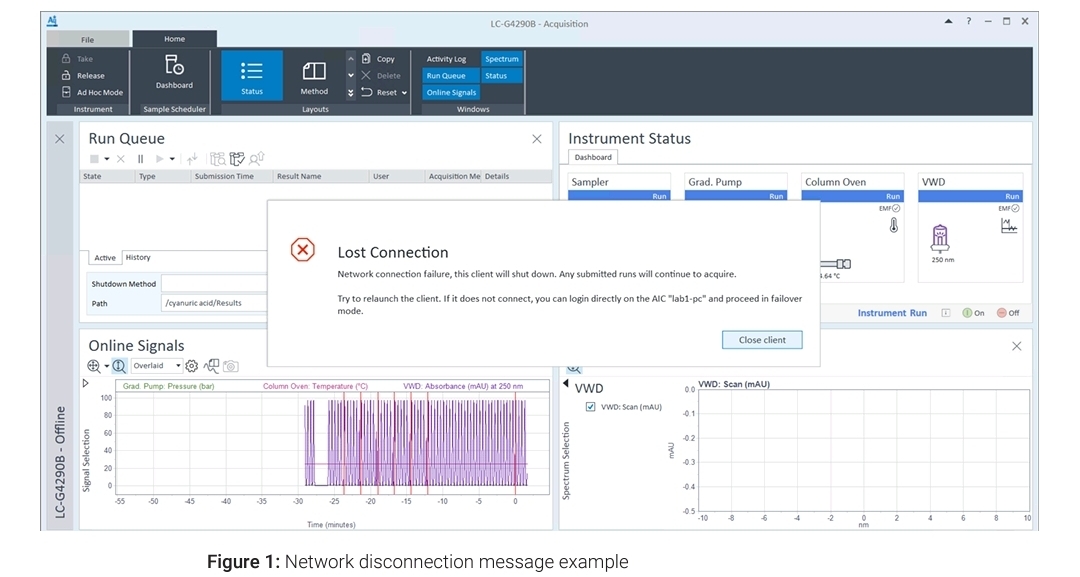
3. When an AIC to server connection is lost and you attempt to submit a run, the run will fail and a message will appear stating the connection is lost.
AIC와 서버 간의 연결이 끊어진 상태에서 런을 제출하려고 하면, 해당 런은 실패하며 연결이 끊어졌다는 메시지가 표시됩니다.
NOTE
When a network connection to a server is not truly lost, but one or more services such as Shared Services, Secure Storage, or OpenLab Automation on the server are down, Failover mode must not be used. Service failures themselves are not handled using Failover.
Shared Services : 사용자·권한·인증 관리 공통 서비스
Secure Storage : 보안 데이터 저장 영역
OpenLab Automation : 자동화 작업·워크플로우 서비스
서버에 대한 네트워크 연결이 실제로 끊어진 것이 아니라, 서버 상의 Shared Services, Secure Storage, 또는 OpenLab Automation과 같은 하나 이상의 서비스가 중단된 경우에는 페일오버 모드를 사용해서는 안 됩니다. 서비스 자체의 장애는 페일오버로 처리되지 않습니다.
=> 네트워크는 멀쩡한데 서비스만 고장 난 상태에서 Failover를 억지로 실행하면 데이터가 뒤엉키거나 영영 잃어버릴 위험이 있다.
ex) 인터넷은 되는데 카카오톡 서버만 터진 상황이라고 생각할때 카카오톡을 고쳐야지 인터넷을 고쳐야할 문제는 아님.
3. How to Access Failover Mode
3-1. Identify the AIC machine name for the instrument
To run an instrument in Failover mode, you must identify the AIC on which the instrument is configured. The AIC name is provided in the lost connection message (see How Failover Mode is Triggered on page 7). You can also identify the AIC from the Instrument Controllers Reports in Control Panel Administrative Reports, which can be printed for the entire lab when the connection to OpenLab Server is up and running.
configure [kənˈfɪɡjər] : 설정하다
up and running : 정상 가동중인
해당 장비에 대해 AIC machine name을 식별하십시오.
페일오버 모드에서 장비를 run하려면, 해당 장비가 설정되어 있는 AIC를 반드시 식별해야 합니다.
AIC 이름은 lost connection 메시지에 표시되며, 이는 7페이지의 ‘Failover 모드가 트리거되는 방법’을 참고하십시오. 또한 Control Panel의 관리 보고서에 있는 장비 컨트롤러 보고서(Instrument Controllers Reports)에서 AIC를 식별할 수도 있습니다. 이 보고서는 OpenLab 서버와의 연결이 정상적으로 작동 중일 때 전체 실험실 단위로 출력할 수 있습니다.
3-2. Connect to the AIC
Once you have the AIC name, you can connect and log in directly to the AIC by connecting a keyboard, mouse, and monitor to the AIC or remotely by using the Windows Remote Desktop Connection utility.
AIC 이름을 알게 되면, AIC에 키보드, 마우스, 모니터를 직접 연결하거나 Windows 원격 데스크톱(Remote Desktop Connection) 유틸리티를 사용해 원격으로 접속하고 로그인할 수 있습니다.
Any user with physical access to the AIC can launch Failover mode when the Acquisition Clients and AICs have lost connection to the server.
physical access : 마우스·키보드·모니터를 AIC 본체에 직접 연결할 수 있는 권한
Acquisition 클라이언트 및 AIC가 서버와의 연결을 잃은 경우, AIC에 물리적으로 접근할 수 있는(physical access) 모든 사용자는 Failover 모드를 실행(launch)할 수 있습니다.
To access Failover mode, launch the Control Panel on an AIC.
• If a connection cannot be made to the central server, there will be a prompt to access Failover mode.
prompt [prɒmpt] : 안내문, 요청 창, 입력 요구 메시지
중앙 서버(central server)와 연결을 할 수 없으면, Failover 모드에 접근하라는 안내 창이 나타납니다.

• If the user was already directly accessing an AIC when the connection to the server was active, close and relaunch the Control Panel.
사용자가 서버와의 연결이 활성화된 상태에서 이미 AIC에 직접 접근 중이었다면, 컨트롤 패널을 닫고 다시 실행하십시오.
note
Any action you perform in Failover mode is attributed to the “System” user, since the AIC cannot determine which user is performing the action. It is the responsibility of your organization to manage and control access to the AIC and manage the traceability of the actions performed in Failover mode.
attribute to [/əˈtrɪbjuːt tuː/] : ~로 귀속시키다
responsibility [/rɪˌspɑːnsəˈbɪləti/] : 책임
organization [/ˌɔːrɡənəˈzeɪʃən/] : 조직
traceability [/ˌtreɪsəˈbɪləti/] : 추적 가능성
Failover mode에서 수행하는 모든 작업은, AIC가 어떤 사용자가 해당 작업을 수행했는지 판단할 수 없기 때문에, “System” 사용자에게 귀속됩니다. Failover mode에서 수행된 작업에 대해, AIC에 대한 접근을 관리·통제하고,
그 작업들의 추적성(traceability)을 관리하는 책임은 귀 조직(회사)에 있습니다.
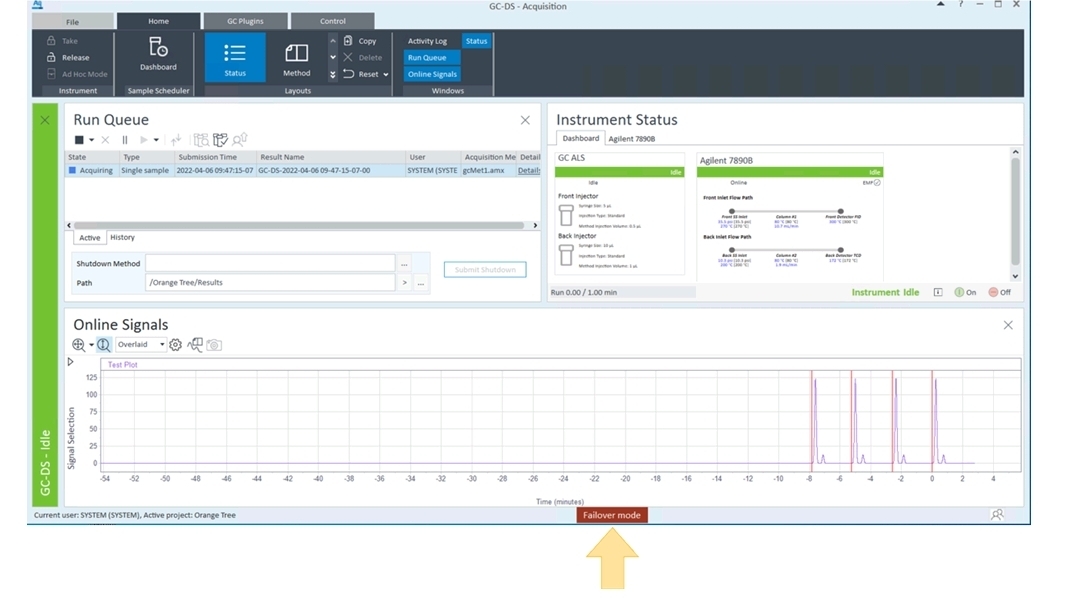
When the system is running in Failover mode, a red Failover mode status is displayed at the bottom of the Acquisition Client application.
시스템이 Failover mode로 실행 중일 때, Acquisition Client 애플리케이션 하단에 빨간색 Failover mode 상태 표시가 나타납니다.
4. Files, Projects, and Instruments Available in Failover Mode
4-1. Files
AICs automatically cache any methods (.amx, .pmx, .smx), sequences (.sqx), and report templates (.rdl) used during runs executed by them. Such cached files are available for use when submitting new single samples or sequence runs in Failover mode.
cache [/kæʃ/] : 임시 저장하다
execute [ˈeksɪkjuːt] : 실행하다
AIC는 자신이 수행한 분석에서 사용된 모든 방법(methods) 파일(.amx, .pmx, .smx), 시퀀스(sequences) 파일(.sqx), 리포트 템플릿(report templates) 파일(.rdl)을 자동으로 캐시(cache) 합니다. 이렇게 캐시된 파일들은 Failover mode에서 새로운 single sample 또는 sequence run을 제출할 때 사용할 수 있습니다.
If you need to run with a method that is not in the cache, you can also create a new method and use it to submit a single sample or sequence run. However, these newly created methods are not automatically synchronized to the server. It is the responsibility of your organization to document, manage, and preserve such methods and their relationship to the generated result sets.
preserve [/prɪˈzɜːrv/] : 보존하다
만약 캐시에 없는 방법으로 분석을 수행해야 한다면, 새로운 방법을 생성하여 단일 시료 또는 시퀀스 분석을 제출할 수도 있습니다. 그러나 이렇게 새로 생성된 방법들은 서버로 자동 동기화되지 않습니다. 이러한 방법들과 그 방법으로 생성된 결과 데이터(result sets)와의 관계를 문서화하고, 관리하며, 보존할 책임은 귀 조직에 있습니다.
You can create a new method (.amx, .pmx, .smx) in Failover mode to submit a single sample or sequence run; however, these methods are stored locally in the AIC and do not get synchronized to Content Management. It is the responsibility of your organization to manage and preserve the relationship to the result sets.
Failover mode에서 새로운 방법(.amx, .pmx, .smx)을 생성하여 단일 시료 또는 시퀀스 분석을 제출할 수는 있지만,
이 방법들은 AIC 로컬에만 저장되며 Content Management로 동기화되지 않습니다. 결과 데이터와의 관계를 관리하고 보존할 책임은 귀 조직에 있습니다.
4-2. Projects
When running in connected mode, AICs cache projects and project groups every 30 minutes. These cached projects are available for use in Failover mode. You cannot create new projects in Failover mode.
시스템이 connected mode로 실행 중일 때, AIC는 30분마다 프로젝트와 프로젝트 그룹을 캐시(cache) 합니다. 이렇게 캐시된 프로젝트들은 Failover mode에서 사용할 수 있습니다. Failover mode에서는 새로운 프로젝트를 생성할 수 없습니다.
NOTE
If a project/project group is created or updated after the most recent synchronization, those changes will not be visible in Failover mode. Those changes will be synchronized next time after the connection from the AIC to the server is restored.
가장 최근 동기화 이후에 프로젝트 또는 프로젝트 그룹이 생성되거나 수정되었다면, 그 변경 사항은 Failover mode에서는 보이지 않습니다. 이러한 변경 사항들은
AIC와 서버 간의 연결이 복구된 후 다음 동기화 시점에
동기화됩니다.
4-3. Instruments
In Failover mode, the AIC will only display the instruments it hosts.
Failover mode에서는 AIC가 자신이 호스팅(host)하고 있는 기기만 표시합니다.
NOTE
You cannot create new instruments in Failover.
Failover mode에서는 새로운 기기를 생성(등록)할 수 없습니다.
5. Operating in Failover Mode
5-1. Project cannot be created or modified.
5-2. Instruments cannot be created, configured, or reconfigured in Failover mode.
5-3. System Settings cannot be modified.
5-4. Acquisition and Data Analysis have limitations added to their normal behaviors while in Failover mode (otherwise they function the same).
Failover mode에서는 Acquisition과 Data Analysis가
일반 동작에 일부 제한이 추가되지만, 그 외에는 동일하게 동작합니다.
• Runs submitted in normal mode cannot be reviewed in Data Analysis in Failover mode, and vice vers
• Sequences submitted in normal mode cannot be viewed in Failover mode, and vice versa
• Snapshots cannot be taken of sequences submitted in normal mode, and vice versa.
vice versa [/ˌvaɪs ˈvɜːrsə/] 그 반대도 마찬가지로
정상 모드에서 제출된 Run, Sequence, Snapshot은 Failover mode의 Data Analysis에서 검토/보기/생성할 수 없으며, 그 반대도 마찬가지입니다.
• Activity log entries generated in Failover mode are tagged with Failover once normal mode is restored
Failover mode에서 생성된 Activity log 항목들은 정상 모드가 복구되면 Failover 태그가 붙습니다.
• Sequences submitted in Failover mode are named with the <I> <DS> tokens by default, and will have <DS> attached to the end of an existing name if no other date/time token is already attached.
token [/ˈtoʊkən/] 식별자
Failover mode에서 제출된 시퀀스는 기본적으로 <I> <DS> 토큰을 포함한 이름으로 생성되며, 이미 날짜/시간 토큰이 없다면 기존 이름 끝에 <DS>가 추가됩니다.
• Result names have a short date token appended to their selected names.
append [/əˈpend/] 덧붙이다
결과 이름에는 선택된 이름 뒤에 짧은 날짜 토큰이 추가됩니다.
5-5. To print hard copy reports on the AIC’s default printer, when submitting the sequence, select [Local Printer] as the destination printer in the Acquisition client or specify [Local Printer] as the destination printer for reports in the processing method.
hard copy report : 종이 출력 보고서, 인쇄된 보고서
(<-> soft copy : 전자 파일)
AIC의 기본 프린터로 종이 출력 보고서를 인쇄하려면, 시퀀스 제출 시 프린터 대상으로 [Local Printer]를 선택하거나 Processing method에서 보고서 출력 프린터를 [Local Printer]로 지정해야 합니다.
5-6. When the network is restored, the message "Network connection is restored. Relaunch the OpenLab Control Panel and Acquisition Client to exit Failover mode" will appear on each Acquisition client window.
네트워크가 복구되면 각 Acquisition Client 창에 “네트워크 연결이 복구되었습니다. Failover mode를 종료하려면 OpenLab Control Panel과 Acquisition Client를 다시 실행하십시오.” 라는 메시지가 표시됩니다.
• After acknowledging the message, you can complete your actions or submit new runs.
acknowledge [ək|nɑːlɪdʒ] : 인정하다, 받았음을 알리다
해당 메시지를 확인한 후 작업을 완료하거나 새로운 분석을 제출할 수 있습니다.
5-7. When the connection is restored, activity log entries collected in Failover mode are uploaded to the server and all entries will have the same name of the AIC where the event occurred as the username.
연결이 복구되면 Failover mode에서 수집된 Activity log 항목들이 서버로 업로드되며, 모든 항목의 사용자 이름은 이벤트가 발생한 AIC 이름으로 기록됩니다.
6. Data Transfer to Content Management
All results files from runs submitted while in Failover mode will be cached and stored on the AIC. Once the connection is restored, the user needs to use a special tool to upload the data acquired in Failover mode to the central server.
Failover mode에서 제출된 분석(run)으로부터 생성된 모든 결과 파일은 AIC에 캐시되어 저장됩니다. 연결이 복구되면, 사용자는 Failover mode에서 획득한 데이터를 중앙 서버로 업로드하기 위해 특수 도구를 사용해야 합니다.
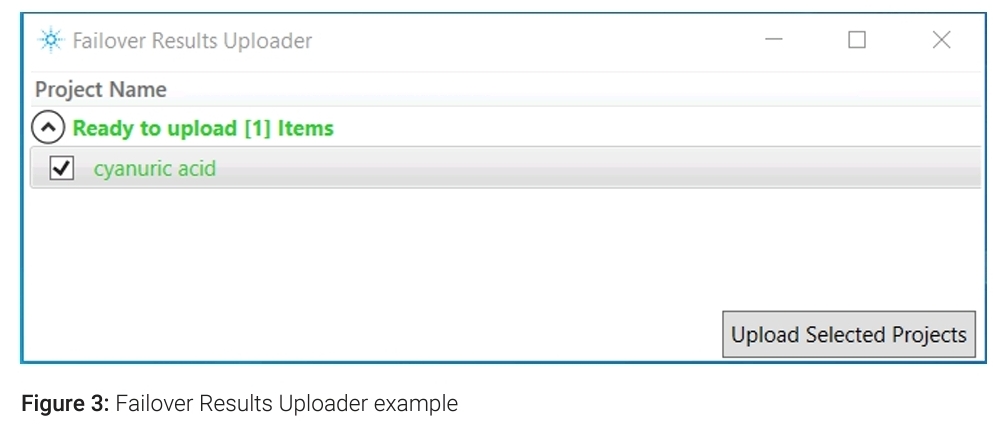
Once the network is restored, the Failover Results Uploader is used for manually transferring project results data generated in Failover mode to Content Management.
네트워크가 복구되면, Failover mode에서 생성된 프로젝트 결과 데이터를 Content Management로 수동 전송하기 위해 Failover Results Uploader를 사용합니다.
Only results can be uploaded using the tool. Method, sequence, sequence template, and result template files need to be manually uploaded directly to the Server.
이 도구를 사용하여 결과 데이터만 업로드할 수 있습니다. Method, sequence, sequence template, result template 파일은 서버로 직접 수동 업로드해야 합니다.
1. To launch the tool, on an AIC that has reestablished its connection to the Server, click Start > Agilent Technologies > > Failover Results Uploader.
도구를 실행하려면, 서버와의 연결이 복구된 AIC에서 Start > Agilent Technologies > Failover Results Uploader를 클릭합니다.
2. When prompted, enter your user credentials.
credential [krəˈdenʃl] : 자격 증명서
요청되면 사용자 인증 정보(ID/비밀번호)를 입력합니다.
3. The tool looks for results stored in the following location: C:\CDSProjects\<Project Name>\Results.
이 도구는 다음 위치에 저장된 결과를 검색합니다.
C:\CDSProjects\<Project Name>\Results
Only projects with valid results (those that contain .mfx data files) are available for upload.
유효한 결과(.mfx 파일)를 포함한 프로젝트만 업로드 가능합니다.
Results that can be uploaded are displayed in green. Additional projects that have no data are displayed in gray. If no results are detected, the following message is displayed: Found no failover results to upload.
업로드 가능한 결과 → 초록색(green) 표시
데이터 없는 프로젝트 → 회색(gray) 표시
결과가 없으면 → “Found no failover results to upload” 메시지 표시
Users without the permission to access a project folder will not be able to upload data from that project.
프로젝트 폴더 접근 권한이 없는 사용자는 해당 프로젝트 데이터를 업로드할 수 없습니다.
Select one or more projects and click Upload Selected Projects.
하나 이상의 프로젝트를 선택한 후 Upload Selected Projects 클릭합니다.
Duplicate data cannot be uploaded.
중복 데이터는 업로드할 수 없습니다.
Result set files are passed to the File Upload Queue to be transferred to Content Management.
Result set files은 Content Management로 전송되기 위해 File Upload Queue로 전달된다.
Uploaded result set files are acknowledged in the Content Management Activity log.
업로드된 result set files은 Content Management의 Activity log에 기록된다.
Once a result set file has been uploaded, it is deleted from the local AIC storage.
result set files이 한 번 업로드되면, 해당 파일은 로컬 AIC 저장소에서 삭제된다.
NOTE
Upon reconnection, runs completed in normal mode before the disconnection will be automatically uploaded to Content Management by the File Upload Queue.
재연결이 이루어지면, 연결이 끊어지기 전에 Normal mode에서 완료된 Run들은 File Upload Queue에 의해 자동으로 Content Management로 업로드된다.
7. Traceability
Any user with physical access to the AIC can launch Failover mode when the Acquisition Client or the AIC loses its connection to the server.
Acquisition Client 또는 AIC가 서버와의 연결을 잃었을 때, AIC에 물리적으로 접근할 수 있는 사용자라면 누구나 Failover(장애 조치) 모드를 실행할 수 있습니다.
Any action you perform in Failover mode is attributed to the System user, since the AIC cannot determine which user is performing the action. It is the responsibility of your organization to manage and control access to the AIC and manage the traceability of the actions performed in Failover mode.
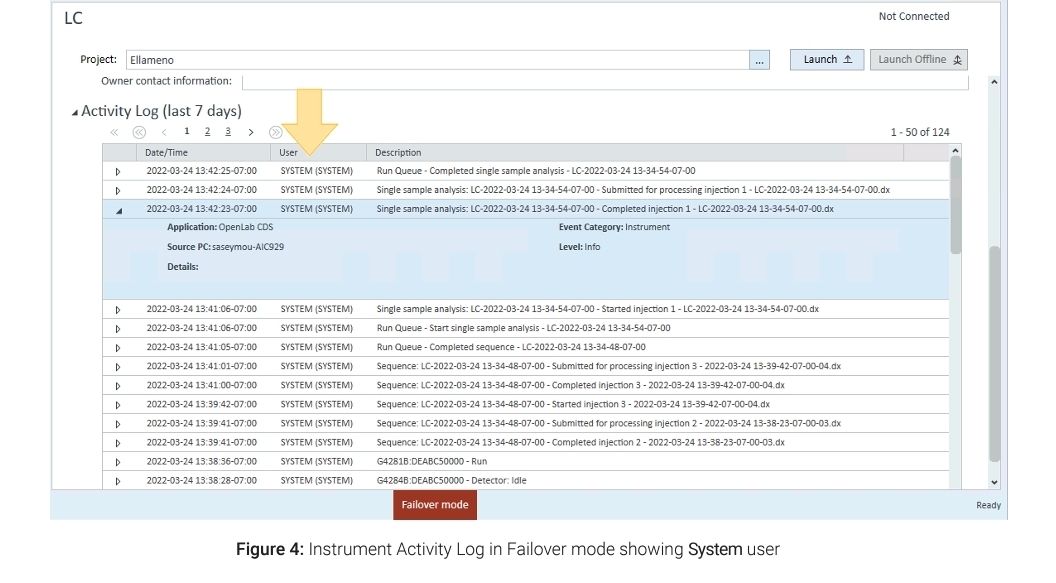

AIC는 어떤 사용자가 작업을 수행하는지 판단할 수 없기 때문에, Failover 모드에서 수행하는 모든 작업은 'System' 사용자의 작업으로 간주됩니다. 따라서 AIC에 대한 접근을 관리 및 통제하고, Failover 모드에서 수행된 작업에 대한 추적성을 관리하는 것은 귀하의 조직(회사)의 책임입니다.
=> 정상 모드에서는 서버가 로그인 정보를 확인하여 "누가" 분석했는지 기록(Audit Trail)한다. 하지만 서버와 연결이 끊긴 Failover 모드에서는 서버의 인증 기능을 쓸 수 없다. 이때는 보안이 풀린 상태와 비슷하므로, 로그에 실제 사용자 이름 대신 'System'이라고만 찍히게 된다. 즉, 나중에 문제가 생겨도 데이터 조작이나 실수한 사람을 시스템상으로는 찾을 수 없다는 뜻.
If the AIC "System" user creates a new method (.amx, .pmx, .smx) in Failover mode to submit a single sample or sequence run, the Injection Audit Trail and Result Set Audit Trail calls out these methods as Failover. It is the responsibility of your organization to manage the traceability between the method and result set.
call out : 명시하다
만약 AIC "System" 사용자가 단일 시료 또는 시퀀스 분석을 실행하기 위해 Failover 모드에서 새로운 분석법(.amx, .pmx, .smx)을 생성하면, 주입 감사 추적(Injection Audit Trail)과 결과 세트 감사 추적(Result Set Audit Trail)은 이 분석법들을 'Failover'라고 표시합니다. 해당 분석법과 결과 세트 사이의 추적성을 관리하는 것은 귀하의 조직(회사)의 책임입니다.
When the network is restored and normal mode is reestablished:
- Sequences and samples submitted in Failover mode are tagged with Failover in the Instrument Activity Log, Injection Audit Trail, Sequence Audit Trail, and Result Set Audit Trail.
- In the Instrument Activity Log, the User name changes from System to the AIC name.
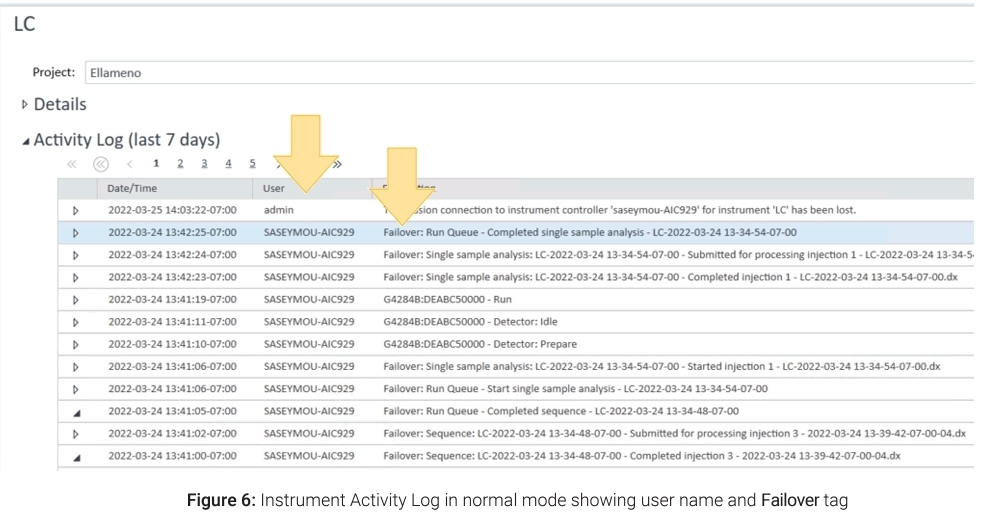
네트워크가 복구되고 정상 모드가 재수립되면 :
Failover 모드에서 제출된 시퀀스와 시료들은 장비 활동 로그, 주입 감사 추적, 시퀀스 감사 추적 및 결과 세트 감사 추적에서 'Failover'라는 태그(꼬리표)가 붙습니다.
장비 활동 로그에서 사용자 이름은 'System'에서 'AIC 이름'으로 변경됩니다.
=> Failover에서 만들어진 데이터는 누가 만들었는지 서버가 모르기 때문에 시스템이 자동으로 Failover Tag를 모든 기록에 남긴다. 나중에 서버가 복구되면 'System'이라는 모호한 이름 대신, "어떤 AIC 장비에서 발생한 일인지" 그 장비의 이름으로 사용자 칸을 업데이트하여 최소한의 출처를 밝한다. 하지만 실제 "어떤 사람"이 분석했는지는 시스템이 끝까지 알 수 없으므로, 사람이 직접 문서로 증명해야 한다.
출처
https://www.agilent.com/cs/library/usermanuals/public/CDS_v2.8_Failover_en.pdf