Home > Acquisition > Sequence > Override the printer in processing method
When creating your sequence, you can select a printer to print the corresponding injection reports and override the printer specified in the processing method. Once a sequence is submitted, you can edit the sequence and change the override printer to print the remaining injections reports. The last selection made is stored and pre-selected the next time you open Acquisition.
분석법에 지정된 프린터를 무시합니다. 시퀀스를 생성할 때, 해당 주입(injection) 리포트를 출력할 프린터를 선택할 수 있으며, 이는 분석법에 명시된 프린터 설정을 대체합니다. 시퀀스가 제출된 후에도 시퀀스를 편집하여 남은 주입 리포트를 출력할 오버라이드 프린터를 변경할 수 있습니다. 마지막에 선택된 설정은 저장되어 다음번에 'Acquisition' 창을 열 때 미리 선택된 상태로 나타납니다.
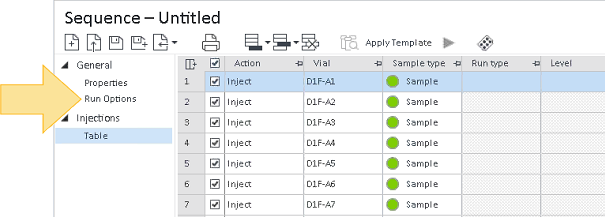
1. With a sequence loaded in the sequence table, click Run Options.
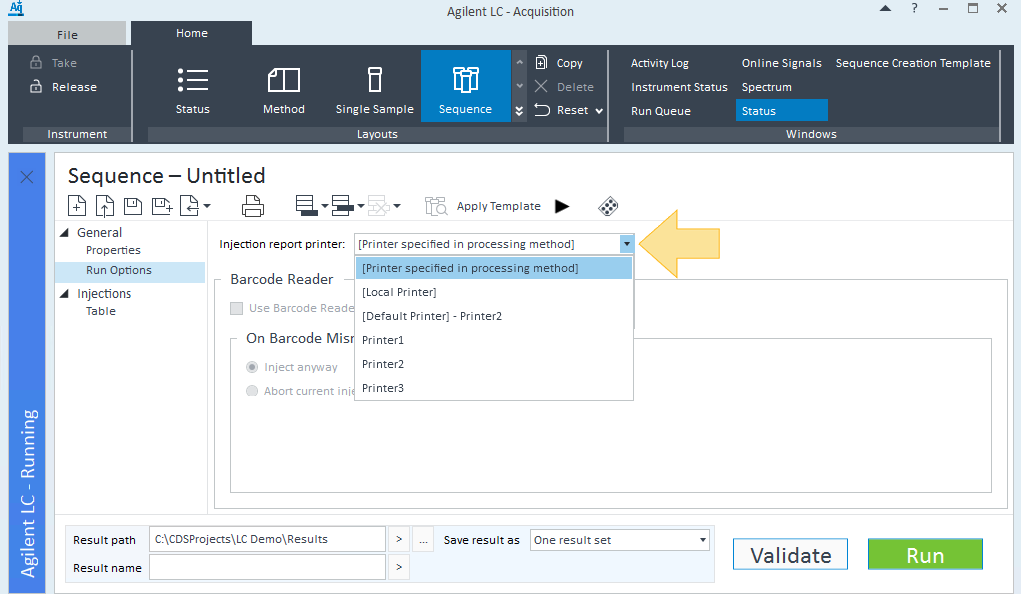
2. Select a printer from the Injection report printer list.
[Printer specified in processing method]: The printer currently specified in the processing method.
[분석법에 지정된 프린터]: 현재 분석법에 설정되어 있는 프린터입니다.
[Local Printer]: The printer set as the default printer in OpenLab CDS 2.6 or earlier.
[로컬 프린터]: OpenLab CDS 2.6 또는 그 이전 버전에서 기본 프린터로 설정된 프린터입니다.
[Default Printer]: The printer set as the default printer in Control Panel. If no printer has been set as default, the option still appears but without an associated printer.
[기본 프린터]: 제어판에서 기본 프린터로 설정된 장치입니다. 기본 프린터가 설정되어 있지 않아도 옵션은 나타나지만 연결된 프린터 정보는 표시되지 않습니다.
User-defined printers: The shared printer(s) created in Control Panel.
사용자 정의 프린터: 제어판에서 생성된 공유 프린터들입니다.