Use barcoded vials anywhere on sample tray
Home > Acquisition > Sequence > Use barcodes > Use barcoded vials anywhere on sample tray
Barcode values are used when preparing a sequence. You can scan the barcodes, and place the vials anywhere into the instrument. The correct sample will be injected based on the expected barcode from the sequence table.
바코드 값은 시퀀스를 준비할 때 사용됩니다. 바코드를 스캔한 후 바이알을 기기 내 어디에나 배치할 수 있습니다. 시퀀스 테이블에 입력된 '예상 바코드(Expected barcode)'를 기반으로 정확한 샘플이 주입됩니다.
=> 오토샘플러(Autosampler)에 바코드 리더기가 장착된 경우, 기기가 트레이 전체를 스캔하며 바코드를 찾아낸다. 따라서 분석자가 1번 샘플을 50번 칸에 잘못 꽂아도, 바코드만 맞으면 기기가 알아서 찾아가 분석한다. Human Error를 방지하는 강력한 기능.
Preparations
Instrument configuration: Ensure that the option Barcode reader installed is enabled.
Barcode reader installed 옵션이 활성화되어 있는지 확인하십시오.
1. Click Sequence.
2. Create a new sequence, or edit an existing one.
3. Use the barcode reader to scan your barcoded vials and enter them in the Expected Barcode column. You do not need to specify the vial position in the Vial column.
바코드 리더기를 사용하여 바코드 바이알을 스캔하고 Expected Barcode 열에 입력하십시오. 'Vial' 열에 바이알 위치를 지정할 필요가 없습니다.
NOTE
If the expected barcode and vial position are both specified, then the vial position is used.
만약 예상 바코드와 바이알 위치가 모두 지정된 경우, 바이알 위치가 우선적으로 사용됩니다.
4. Complete the Sequence table
5. Click Run.
If an expected barcode cannot be found in the instrument, the run will be skipped.
만약 기기에서 예상된 바코드를 찾을 수 없는 경우, 해당 분석(Run)은 건너뛰게 됩니다.
바코드 스캔 -> 바코드번호가 Expected Barcode 열에 뜸 -> 나머지 열 작성(ex. sample name, method, data file 등등) * vial location은 작성 안해도됨.
Check barcodes during a run
Home > Acquisition > Sequence > Use barcodes > Check barcodes during a run
Barcode values are used during acquisition as a means to trace inputs of samples as well as data outputs. This feature is supported by the following devices: Agilent GC (7683, 7693, CTC PAL, or 7697A Headspace) and Agilent LC Multisamplers (if Barcode reader installed is selected in your LC instrument configuration).
바코드 값은 분석 데이터 획득 과정에서 샘플의 투입뿐만 아니라 데이터 출력 결과를 추적하는 수단으로 사용됩니다. 이 기능은 다음 장치에서 지원됩니다: Agilent GC(7683, 7693, CTC PAL 또는 7697A 헤드스페이스) 및 Agilent LC 멀티샘플러(LC 장비 설정에서 바코드 리더 설치가 선택된 경우).
When creating a sequence table before acquisition, you can enter the expected barcodes into the Expected Barcode column of the sequence table by running a manual scan of the vials or by typing the barcode value directly into the column.
분석을 시작하기 전에 시퀀스 테이블을 만들 때, 바이알(vial)을 수동으로 스캔하거나 바코드 값을 컬럼에 직접 입력하여 '예상 바코드(Expected Barcode)' 항목을 채울 수 있습니다.
If a specified barcode cannot be detected in the instrument, the barcode field is highlighted in the sequence table. In this case, when you submit the sequence, you will receive a warning that one or more barcodes cannot be detected.
지정된 바코드를 기기에서 감지할 수 없는 경우, 시퀀스 테이블의 바코드 칸이 강조 표시됩니다. 이 상태에서 시퀀스를 제출하면 하나 이상의 바코드를 감지할 수 없다는 경고 메시지가 나타납니다.
Once you have entered values in the Expected Barcode column of the sequence table, set the Run Options so you are alerted if there is a mismatch between the expected barcode in your sequence table and what is scanned on the vial at injection time. You can also set the next action of the system if a mismatch is detected.
시퀀스 테이블의 '예상 바코드' 컬럼에 값을 입력한 후, 시퀀스 테이블의 예상 바코드와 주입 시점에 바이알에서 스캔한 바코드가 일치하지 않을 경우 알림이 뜨도록 '실행 옵션(Run Options)'을 설정하세요. 불일치가 감지될 때 시스템이 취할 다음 조치도 설정할 수 있습니다.
1. Click Sequence.
2. With a sequence loaded in the Sequence table, click Run Options.
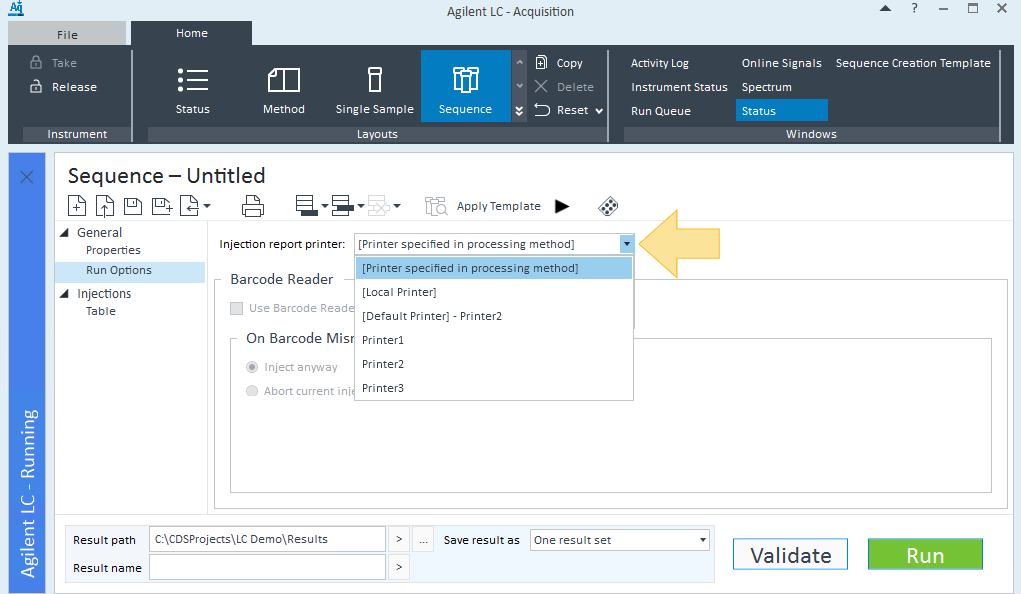
3. Select Use Barcode Reader Before Injection, and select whether to Inject anyway or Abort current injection if there is a barcode mismatch.
If the vial and barcode match, the injection is performed from the specified vial location.
If the vial and barcode do not match, the injection is either performed from the specified location or is aborted.
4. Click Run.
