Home > Acquisition > Sequence > Use Custom Parameters
Custom parameters used in your Sequence table are defined in the Control Panel.
1. Create custom parameters if you have not done so already.
do so : 하나의 숙어처럼 쓰여서 "앞에 나온 대로 하다"라는 뜻
아직 만들지 않았다면 사용자 정의 파라미터를 생성하십시오.
2. Click a cell in the Custom parameters column to display the parameters and associated values in the window below the sequence table.
Custom parameters 열의 셀을 클릭하면 시퀀스 테이블 아래쪽 창에 해당 파라미터와 연결된 값들이 표시됩니다.
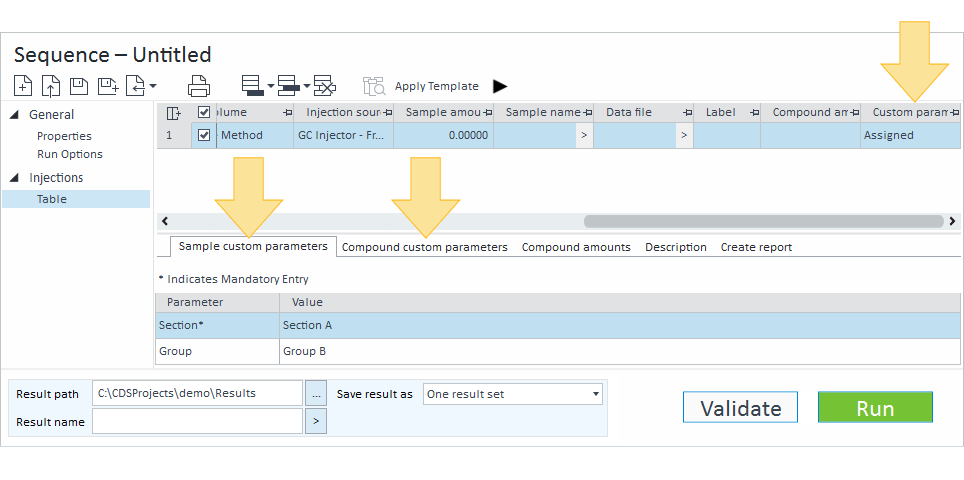
3. You can:
- Keep all default values.
- Click in the Value column to enter, change, or delete the value for that parameter. Mandatory parameters must have a value.
소프트웨어가 기본적으로 제공하는 칸
(바이알 번호, 시료 이름, 분석법 등) 외에
샘플의 추가 정보(로트 번호, 전처리 담당자 등)를 기록해야 할 때가 있다. 이를 위해 사전에 '컨트롤 패널'에서 항목 이름을 먼저 등록하면
시퀀스 테이블에서 사용할 수 있다.