Prepare the Pump
The Agilent 1290 Infinity and 1290 Infinity II Pumps are equipped with automatic purge valves. This enables a variety of additional functions not available in Agilent Pumps with manual purge valves. It is possible to prepare the pump (set paramaters and start the functions Purge, Condition, or Prime) with the software.
Agilent 1290 Infinity 및 1290 Infinity II 펌프에는 자동 퍼지 밸브가 장착되어 있습니다. 이는 수동 퍼지 밸브가 장착된 Agilent 펌프에서는 사용할 수 없는 다양한 추가 기능을 가능하게 합니다. 소프트웨어를 사용하여 펌프를 준비할 수 있다. (파라미터를 설정하고 Purge, Condition, Prime 기능을 시작)
1. Purge
Use the Purge function to:
1-1. Fill the system with fresh or different solvent.
1-1-1. Ensure that the new solvent is miscible with the previous solvent.
1-1-2. Prevent damage to the degasser or pump by using an intermediate step with a co-miscible solvent, if necessary.
시스템을 새 용매 또는 다른 용매로 채울 때
새 용매가 기존 용매와 상호 혼합 가능(miscible) 한지 확인하십시오.
필요 시 서로 혼합 가능한 중간 용매(co-miscible solvent) 를 사용하여 디게서(degasser)나 펌프 손상을 방지하십시오.
1-2. Remove air bubbles in tubes and pump heads.
1-2-1. After the pump has been idle for a few hours or more (air may have diffused into the solvent lines).
idle [aɪdl] : 유휴(遊(놀 유) + 休(쉴 휴))
= 멈춰 있음 / 사용되지 않음 / 대기 중
diffuse [dɪˈfjuːz] : 확산되다
튜브 및 펌프 헤드 내부의 공기 방울 제거
펌프가 수 시간 이상 정지 상태였던 후 (이때 공기가 용매 라인으로 확산되었을 수 있음)
As soon as the purge procedure ends the module automatically switches to analytical conditions again.
퍼지 절차가 끝나면, 모듈은 자동으로 분석 조건(analytical conditions) 으로 복귀합니다.
2. Condition
If micro air bubbles persist in the pump head, the overall pump performance may be compromised and flow accuracy / precision may be negatively affected. This may be visible as increased pressure and / or detector baseline ripple. A reliable indicator of such situation is a strongly negative but slowly increasing tuning signal value (below –1). To remove the air efficiently, the Condition function can be used. During conditioning, the pump is delivering flow into the system (column) and the last used method settings, like flow, composition and max pressure are used. It is not possible to perform sample analysis while conditioning.
persist [pərˈsɪst] : 지속되다
ripple [rípl] : 잔물결 => 잔물결 형태의 노이즈
precision [prɪˈsɪʒn]: 정확성
strongly negative but slowly increasing tuning signal value (below –1)
<액체 vs 공기: 물리적 차이>
• 액체(용매) : 거의 압축되지 않아 펌프 피스톤이 밀면 즉시 압력 상승 => 압력–시간 곡선이 예측 가능
• 공기 : 매우 잘 압축되어 펌프 피스톤이 밀면 처음에는 공기만 찌그러져 압력이 늦게 전달 => 압력 응답이 느리고 비선형적 (지연 + 불완전) -> 내부 모델과 불일치 발생 : 음수 방향 오차
<음수(negative)>
tuning signal = 실제 압력 응답 – 이상적인 압력 응답
• 정상: 차이 ≈ 0
• 공기 존재: 실제 압력 < 기대 압력 → 결과값 음수
=> 공기 많을수록 더 음수 (–1 이하 : 명확한 이상 상태)
strongly negative : 공기가 분명히 존재 (펌프 헤드 안에 압축성 공간이 큼)
slowly increasing : 공기가 조금씩 용매에 녹거나 이동
그러나 자연 회복 속도가 매우 느리므로
Condition을 써라 = 높은 압력 + 실제 유량으로 공기를 강제로 밀어내라
펌프 헤드 내부에 미세 공기 방울이 지속적으로 존재하면, 펌프 전체 성능이 저하되고 유량 정확도(accuracy) 및 정밀도(precision)가 나빠질 수 있습니다. 이는 압력 증가 또는 검출기 베이스라인의 ripple로 관찰될 수 있습니다. 이러한 상태를 신뢰성 있게 나타내는 지표는 –1 이하의 매우 음수이지만 서서히 증가하는 튜닝 신호 값입니다.
공기를 효율적으로 제거하기 위해 Condition 기능을 사용할 수 있습니다. 컨디셔닝 중에는 펌프가 시스템(컬럼)으로 실제 유량을 공급하며, 마지막으로 사용한 메서드 설정값 (유량, 용매 조성, 최대 압력 등)이 그대로 적용됩니다.
컨디셔닝 중에는 시료 분석을 수행할 수 없습니다.
Use a reasonable flow rate (for example 1.5 mL/min), composition setting (for example A: 50 % B: 50 %) and backpressure (>200 bar) to ensure efficient air bubble removal from all pump heads.
모든 펌프 헤드에서 공기 방울을 효과적으로 제거하기 위해
합리적인 유량(예: 1.5 mL/min)과 용매 조성(예: A 50 % / B 50 %)과 충분한 백프레셔 (200 bar 초과)를 사용하라.
=> 1.5 mL/min : 펌프에 무리를 주지 않으면서
공기 이동에 필요한 최소 유체 운동량
=> 혼합 용매 : 극성·비극성 특성을 동시에 가져
공기를 용매 내부로 용해시키는 데 단일용매보다 유리
=> 백프레셔 (200 bar 초과) : 압력 ↑ → 기체 부피 ↓
Condition the pump if you see:
Excessive pressure ripple.
과도한 압력 리플
Excessive composition ripple (baseline noise/mixing noise – noise level changes with the composition), when you are sure that the solvent type is correctly set, and there is no evidence of a leak in the pump.
용매 종류 설정이 올바르고 펌프 누출이 없음에도 조성 리플이 과도할 때 (베이스라인 노이즈 / 혼합 노이즈, 조성 변화에 따라 노이즈 레벨이 변함)
Conditioning may be necessary:
- After a long period of standby
- After running out of solvent
- After service or repair
CAUTION
- Filling empty solvent lines
- Damage to the seals
- Use a syringe or the Purge function to fill empty solvent lines.
- Do not use the Prime procedure to fill empty solvent lines
3. Prime
The Prime function is helpful if air has entered the pump heads and cannot be removed by conditioning for 15 minutes. The module draws solvent at a high speed with all pump drives simultaneously and dispenses it into the waste position of the automatic purge valve. This is done 20 times and is stressful to the valve and rotor seal. Therefore, it should be performed only as a last resource, before forcefully filling the pump heads with a syringe or attempting to repair the pump heads.
simultaneously [saɪml|teɪniəsli] : 동시의
rotor [ˈroʊtər] : 회전하는 부품
dispense [dɪˈspɛns] : 배출하다
Prime 기능은 공기가 펌프 헤드로 들어갔고, Conditioning을 15분 동안 수행해도 제거되지 않을 경우에 유용하다. 이 모듈은 모든 펌프 구동부를 동시에 사용하여 용매를 고속으로 흡입하고, 이를 자동 퍼지 밸브의 폐액 위치로 배출한다. 이 동작은 20회 반복되며, 밸브와 로터 실에 큰 기계적 스트레스를 준다. 따라서 이 기능은, 주사기로 펌프 헤드를 강제로 채우거나, 펌프 헤드를 수리하려 시도하기 전에, 오직 최후의 수단으로만 수행되어야 한다.
Use the Prime function to:
Free a potentially stuck valve.
잠재적으로 걸려 있는 밸브를 풀기 위해
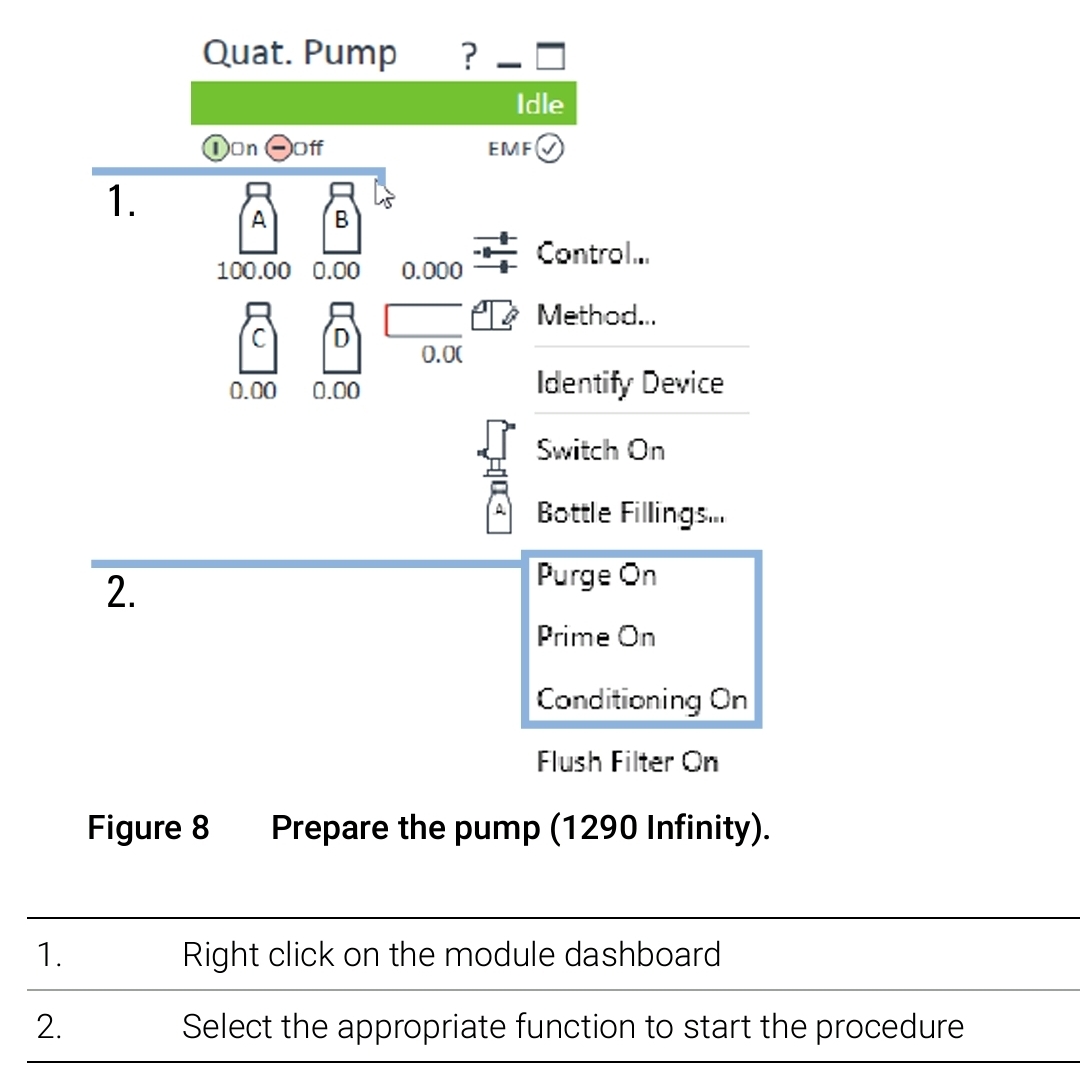
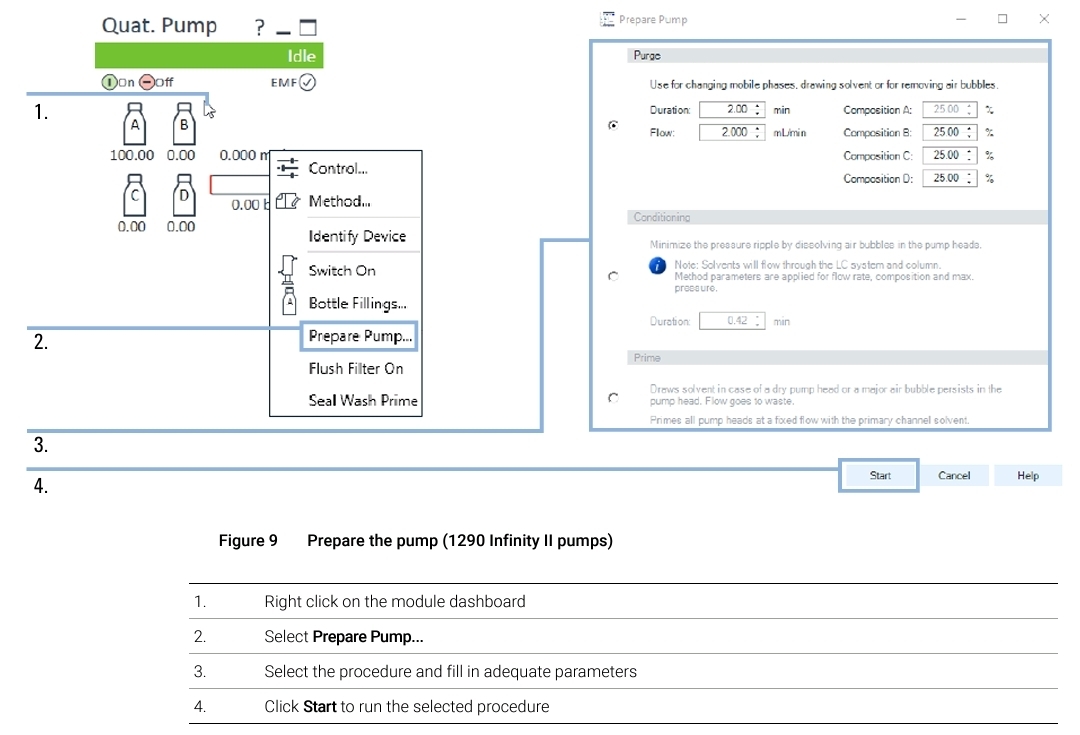
The described functions can be triggered from the driver interface:
1290 Infinity and 1290 Infinity II
설명된 기능들은 드라이버 인터페이스에서 실행할 수 있다.
NOTE
For parameter settings, see Figure 3 on page 11.
The user-optimized Prepare Pump context menu replaces the classical menu: • 1290 Infinity II Pumps
adequate [ædɪkwət] : 적절한